Learning Objectives
By the end of this module, you will be able to:
- Understand the stoplight system and student clearance indicators
- Guide students or families through providing consent
- Upload or collect insurance information for CYBHI billing
See How:
Step 1: Understand the Student Clearance Stoplight System
When you log into Healthy Campus and view your student list, you’ll see a stoplight indicator:
- 🔴 Red = Student is missing all required clearance info (consent to bill, consent to treat, and insurance)
- 🟡 Yellow = Partially cleared (missing one or more items)
- 🟢 Green = Fully cleared for services and billing
You can view and edit a student’s clearance by clicking their profile card, then scrolling to the Student Clearance section at the bottom left of their profile.
Step 2: Add Consent to Treat and Consent to Bill
There are two main paths for collecting consent:
🧍♂️ A. Self-Consent (Student 12+ who meets minor consent criteria)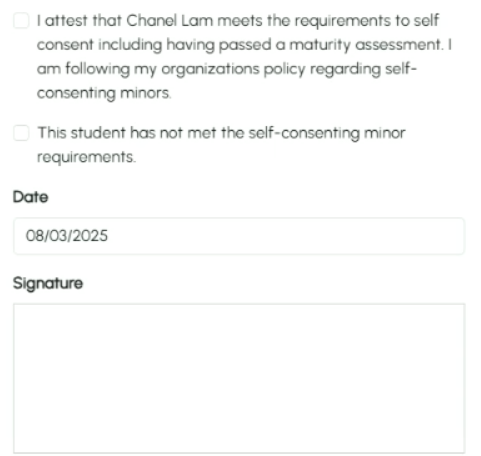
- Click on the Consent to Treat status
- Check the box: “This student meets self-consent criteria”
- Electronically sign as the practitioner
- Click Submit
- On the right-hand side of the screen, click “Complete Digital Form”
- Have the student e-sign using the on-screen signature pad
- Repeat the same process for Consent to Bill
B. Parent/Guardian Consent (for minors who cannot self-consent or choose not to self-consent)
- Click on Consent to Treat
- Check the box: “Student does not meet self-consent criteria”
- Electronically sign as the practitioner
- Upload a signed paper form OR:
- Click “Print” to generate a signable consent form with your district’s approved consent language
- Have the parent/guardian sign it
- Click “Upload Paper Form” and select the file or photo
- Repeat the process for Consent to Bill
📝 Forms can be scanned, photographed, or uploaded from a mobile device
Step 3: Upload Insurance Information
To collect insurance:
- Click the Insurance Info status
- Collect and upload images of the front and back of the insurance card
- Enter the following required information:
- Cardholder’s first and last name
- Date of birth (month and year)
- Gender
- Relationship to the student
- Click Submit
🛡️ If a student is uninsured, they are still eligible for services! A claim will not be generated, however.
✅ Final Check
Once all three indicators are green:
- ✅ Consent to Treat
- ✅ Consent to Bill
- ✅ Insurance Info
…the student is fully cleared for CYBHI!